> ## Documentation Index
> Fetch the complete documentation index at: https://sofiedocs.usetransfer.ai/llms.txt
> Use this file to discover all available pages before exploring further.
# CoMeeting
> Capture meetings, review transcripts, create notes, search discussion history, and use meeting context in Sofie.
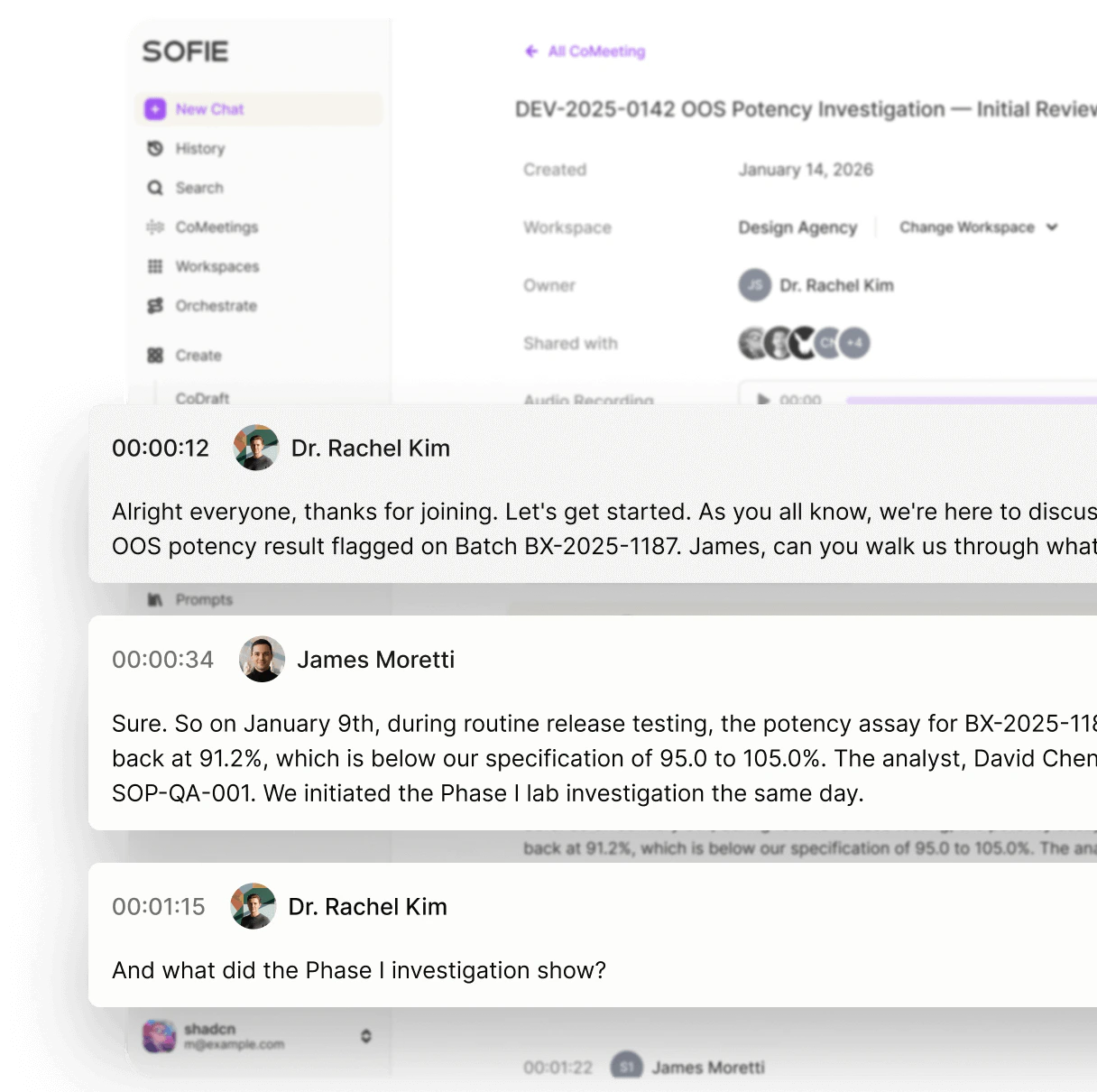
CoMeeting captures discussion so you can review transcripts, notes, summaries, decisions, and follow-up work after the meeting.
For detailed capture and follow-up instructions, see [Capture, review, and use a CoMeeting](/comeetings/capture-review-search).
## When to use CoMeeting
Use CoMeeting for:
* Tech transfer working sessions.
* Deviation investigation interviews.
* CAPA review meetings.
* Validation planning discussions.
* Vendor or CDMO project calls.
* SME interviews.
* Process mapping workshops.
* Recurring quality or operations follow-ups.
Use CoMeeting when the discussion itself becomes a source.
 ## Start a CoMeeting
Use **Start CoMeeting** from the home shortcuts or open **CoMeetings** from the sidebar.
Use in-person capture for discussion near your device. Use virtual capture when your organization supports remote-call audio capture.
Confirm the right microphone or shared audio source is available before the discussion starts.
Start transcription. Pause or resume if needed.
Review transcript, notes, summary, and action items before sharing.
Follow your organization's rules for recording, consent, and meeting capture. Tell participants when a meeting is being captured.
## In-person versus virtual capture
| Meeting type | Use | Watch for |
| ------------ | --------------------------------- | ---------------------------------------------------------------------- |
| In-person | Room discussion near your device. | Place the microphone near speakers and reduce background noise. |
| Virtual | Remote call audio when supported. | Enable shared audio when prompted by your browser or operating system. |
If virtual capture does not hear the call, check whether the share dialog included audio.
## Review a CoMeeting
After capture, review the meeting page.
Use:
* **Transcript** for exact context.
* **Notes** for human-written or refined notes.
* **Summary** for main decisions and themes.
* Shared access details to confirm who can see the meeting.
Useful review questions:
```text theme={null}
Review this CoMeeting. Create a table with decisions, action items, owners, due dates, risks, unresolved questions, and source transcript references where available.
```
```text theme={null}
Turn this SME interview into a CoDraft summary. Separate observed facts, SME opinion, assumptions, and follow-up evidence needed.
```
## Search meetings
CoMeeting search can help you find discussion by title, notes, summary, or transcript content.
Search for:
* Product, process, or equipment names.
* Batch, lot, campaign, or project identifiers.
* Owner names.
* Decisions and open questions.
* Phrases such as `release assay`, `sampling rationale`, `root cause`, or `acceptance criteria`.
Example:
```text theme={null}
Find meetings where we discussed release assay readiness. Summarize unresolved questions and link each question to the meeting it came from.
```
## Use meeting context in chat
Add a CoMeeting as chat context when the transcript or notes should guide Sofie's answer.
Use meeting context to:
* Draft action items.
* Create an SME interview summary.
* Compare meeting decisions with a protocol or CoDraft.
* Find inconsistencies between meeting notes and source files.
* Generate a follow-up email or meeting brief.
If a meeting belongs to a project, associate it with the relevant Workspace. That keeps the transcript, files, chats, and follow-up artifacts together.
## Share meetings
Share meetings only with people who need the transcript, notes, or summary.
Before sharing:
* Review the transcript for sensitive content.
* Confirm the meeting belongs in the selected Workspace.
* Add clarifying notes if a summary could be misunderstood.
* Remove or correct obvious transcription errors that affect meaning.
## Convert a meeting into follow-up work
| Follow-up need | Move to |
| ---------------------------------------------------------- | ----------- |
| Formal summary, investigation narrative, or interview memo | CoDraft |
| Action item tracker or issue log | CoSheet |
| Project context with source files | Workspace |
| Repeatable meeting-to-deliverable process | Orchestrate |
Ask for decisions, action items, owners, due dates, unresolved questions, risks, source gaps, and recommended next documents to review.
## Detailed CoMeeting guide
Use [Capture, review, and use a CoMeeting](/comeetings/capture-review-search) for step-by-step instructions on in-person and virtual capture, transcript review, meeting search, sharing, and turning discussion into CoDraft, CoSheet, Workspace, or Orchestrate follow-up work.
## Start a CoMeeting
Use **Start CoMeeting** from the home shortcuts or open **CoMeetings** from the sidebar.
Use in-person capture for discussion near your device. Use virtual capture when your organization supports remote-call audio capture.
Confirm the right microphone or shared audio source is available before the discussion starts.
Start transcription. Pause or resume if needed.
Review transcript, notes, summary, and action items before sharing.
Follow your organization's rules for recording, consent, and meeting capture. Tell participants when a meeting is being captured.
## In-person versus virtual capture
| Meeting type | Use | Watch for |
| ------------ | --------------------------------- | ---------------------------------------------------------------------- |
| In-person | Room discussion near your device. | Place the microphone near speakers and reduce background noise. |
| Virtual | Remote call audio when supported. | Enable shared audio when prompted by your browser or operating system. |
If virtual capture does not hear the call, check whether the share dialog included audio.
## Review a CoMeeting
After capture, review the meeting page.
Use:
* **Transcript** for exact context.
* **Notes** for human-written or refined notes.
* **Summary** for main decisions and themes.
* Shared access details to confirm who can see the meeting.
Useful review questions:
```text theme={null}
Review this CoMeeting. Create a table with decisions, action items, owners, due dates, risks, unresolved questions, and source transcript references where available.
```
```text theme={null}
Turn this SME interview into a CoDraft summary. Separate observed facts, SME opinion, assumptions, and follow-up evidence needed.
```
## Search meetings
CoMeeting search can help you find discussion by title, notes, summary, or transcript content.
Search for:
* Product, process, or equipment names.
* Batch, lot, campaign, or project identifiers.
* Owner names.
* Decisions and open questions.
* Phrases such as `release assay`, `sampling rationale`, `root cause`, or `acceptance criteria`.
Example:
```text theme={null}
Find meetings where we discussed release assay readiness. Summarize unresolved questions and link each question to the meeting it came from.
```
## Use meeting context in chat
Add a CoMeeting as chat context when the transcript or notes should guide Sofie's answer.
Use meeting context to:
* Draft action items.
* Create an SME interview summary.
* Compare meeting decisions with a protocol or CoDraft.
* Find inconsistencies between meeting notes and source files.
* Generate a follow-up email or meeting brief.
If a meeting belongs to a project, associate it with the relevant Workspace. That keeps the transcript, files, chats, and follow-up artifacts together.
## Share meetings
Share meetings only with people who need the transcript, notes, or summary.
Before sharing:
* Review the transcript for sensitive content.
* Confirm the meeting belongs in the selected Workspace.
* Add clarifying notes if a summary could be misunderstood.
* Remove or correct obvious transcription errors that affect meaning.
## Convert a meeting into follow-up work
| Follow-up need | Move to |
| ---------------------------------------------------------- | ----------- |
| Formal summary, investigation narrative, or interview memo | CoDraft |
| Action item tracker or issue log | CoSheet |
| Project context with source files | Workspace |
| Repeatable meeting-to-deliverable process | Orchestrate |
Ask for decisions, action items, owners, due dates, unresolved questions, risks, source gaps, and recommended next documents to review.
## Detailed CoMeeting guide
Use [Capture, review, and use a CoMeeting](/comeetings/capture-review-search) for step-by-step instructions on in-person and virtual capture, transcript review, meeting search, sharing, and turning discussion into CoDraft, CoSheet, Workspace, or Orchestrate follow-up work.